

Usage Quota
Understanding your monthly test generation quota
Overview
Your kiteto subscription includes a monthly quota for AI-powered test generations. This quota automatically resets each month based on your subscription start date.
Viewing Your Usage
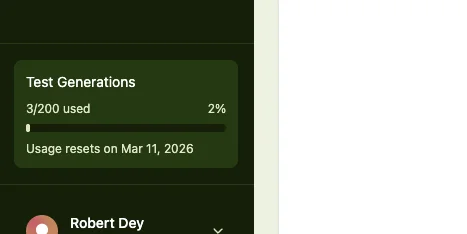
Your current usage is displayed in the left sidebar:
- Usage counter: Shows how many test generations you've used
- Reset date: When your quota resets
When Your Quota Resets
Your quota resets on the same day of the month as your subscription started, not on the 1st of each month.
Example:
- If you subscribed on January 15, your quota resets on the 15th of every month
- Reset happens at midnight UTC
Note
Depending on your timezone, the reset may appear to happen at a different time.
When You Reach Your Limit
When you've used all your test generations for the month:
- The "Generate" button becomes disabled
- You'll see a message: "Your usage quota is fully used for this month"
- You must wait until the next period starts to generate more tests
If you need more test generations before the reset, contact support at support@kiteto.ai.
Frequently Asked Questions
Why doesn't my quota reset on the 1st of the month?
Your quota resets based on when you subscribed, ensuring you always get a full month of usage.
Do unused test generations carry over to the next month?
No, quotas don't accumulate. Each month you get a fresh quota.
What if I need more test generations?
Contact support at support@kiteto.ai to discuss increasing your quota or upgrading your plan.